Launching a storefront without a development team is possible, but “weeks” only holds true when the underlying platform has already solved payment compliance, catalog architecture, and integration plumbing before you sign up. The phrase gets thrown around loosely across the no-code and e-commerce world [passion.io][gokickflip.com][appmaker.xyz], but the actual mechanics behind a fast launch are specific: PCI DSS certification, data residency handling, pre-built connectors to CRM and POS systems, and a merchandising layer that doesn’t need a data scientist to configure. Skip any of these and “weeks” quietly becomes “months,” just with a different vendor doing the delaying.
TL;DR
- “Launch in weeks” is real, but it depends on the platform absorbing compliance work (PCI DSS, PDPA) and integration work before you start, not after.
- A storefront without a dev team still needs payment security, catalog structure, and system integrations handled by someone; the question is whether that someone is you or the vendor.
- AI-powered merchandising can shorten the setup timeline further by automating listing creation and product recommendations, but only if it’s grounded in your actual catalog data.
- Comparing e-commerce platforms on speed alone is misleading; the comparison that matters is what’s pre-integrated versus what you’ll be building yourself later.
- Singapore-based and Southeast Asia-focused merchants have specific regulatory and localization requirements that generic global platforms don’t always address out of the box.
About the Author: Fooyo builds and operates production AI and e-commerce systems for government agencies, enterprises, and SMEs across Asia, including its Fooyo Commerce® storefront platform, which handles product listings, payments, and AI merchandising for clients launching in Singapore, Indonesia, and Japan. This piece draws on that operational experience of moving storefronts from prototype to live in weeks rather than the standard multi-month build cycle.
What Does “Launch in Weeks” Actually Mean for a Storefront?
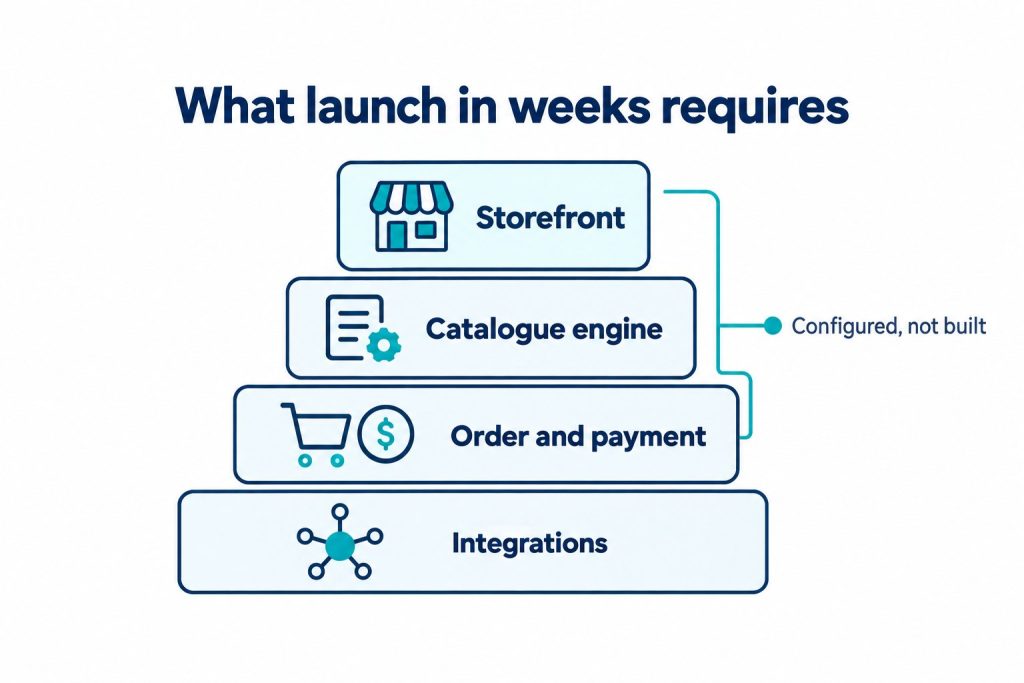
It means the heavy technical lifting was already done by the platform provider before your project started, not that the work disappears entirely. A custom-built storefront typically takes six to eighteen months for enterprise-grade builds, covering everything from payment integration to security review. Platforms that promise a launch in weeks are compressing that timeline by reusing pre-built, pre-certified infrastructure: payment gateways that are already PCI DSS compliant, catalog systems that are already structured, and hosting that’s already configured for regional compliance. You’re not skipping the work; you’re inheriting work that’s already finished.
This is the same logic behind no-code app builders more broadly. Custom development costs far more and takes considerably longer, while no-code and low-code builders let you launch in a fraction of the time by consolidating tools that would otherwise require separate vendors and separate contracts [passion.io]. The tradeoff is that you’re working within the platform’s existing architecture rather than a bespoke one, which is usually the right tradeoff for a storefront that doesn’t need custom logic no one else has ever needed.
What Technical Work Is Actually Hidden Behind a Fast Storefront Launch?
Three categories of work sit behind every fast launch: payment compliance, data handling, and system integration. None of these are optional, and all of them take real time if you’re building from scratch.
- Payment compliance: E-commerce storefronts operating in major Asian markets are universally required to achieve PCI DSS compliance to process credit card transactions. Merchants also typically need EMV 3-D Secure (PCI 3DS) for fraud prevention, plus compliance with local privacy rules such as Singapore’s Personal Data Protection Act (PDPA).
- Data residency and lineage: Private deployments in Singapore and the broader Asia-Pacific region need to meet frameworks like the PDPA and the Monetary Authority of Singapore’s Technology Risk Management guidelines, which require enforced data residency, clear data lineage, and auditability, often keeping sensitive data within sovereign boundaries.
- System integration: Your storefront doesn’t exist in isolation. It needs to talk to your CRM for customer records, your POS if you have physical retail, and often messaging channels for order updates. Building these connections from zero is where many “quick” launches quietly stall.
A useful analogy here is a shipping container. The reason global freight got dramatically faster wasn’t that ships got faster, it’s that the container standardized what gets loaded and how, so ports didn’t need to renegotiate loading logistics for every single shipment. A storefront platform that’s pre-certified for PCI DSS and pre-wired for regional compliance is doing the same thing: standardizing the parts that used to require custom negotiation every time, so the remaining work is just configuration, not construction.
How Does an AI-Powered E-Commerce Platform Change the Setup Timeline?
Building on the compliance and integration groundwork above, the next lever for speed is how much of the storefront configuration itself can be automated. An ai powered ecommerce platform can shorten setup further by generating product listings, structuring categories, and even suggesting merchandising layouts from a product feed rather than requiring someone to build each page by hand. Catalog setup, not payment integration, is often the slowest part of a storefront launch for merchants with large or messy product data.
The caveat is that AI merchandising is only useful if it’s grounded in your actual data rather than generic templates. A recommendation engine that hasn’t ingested your real sales history or inventory constraints will produce listings that look plausible but perform poorly. This is the same principle behind grounded, source-cited AI systems: retrieval systems built for production use hit their targets by using hybrid search and parallelized retrieval against real underlying data, not by guessing. The same discipline applies to AI merchandising: the “AI” part is only as good as what it’s allowed to see.
What Should You Look for When Comparing E-Commerce Platforms?
An honest ecommerce platform comparison has to look past the launch-speed headline and into what’s actually pre-built versus what you’ll need to bolt on yourself. Development guides for platforms like Mage-OS note that a simple catalog and a limited first-year budget point toward starting with a simpler platform rather than a fully custom build [mage-os.org], which is a reasonable framework to borrow even outside that specific ecosystem. Here’s a comparison structure worth applying to any shortlist:
| Evaluation Area | Question to Ask | Why It Matters |
|---|---|---|
| Payment compliance | Is PCI DSS and 3D Secure already built in, or will you need a separate vendor? | Determines whether you can take payments on day one or need a separate integration project |
| Data residency | Where is customer data stored, and does it meet PDPA or local requirements? | Non-compliance risk grows with scale, not shrinks |
| Integration depth | Does it plug into your existing CRM, POS, and messaging channels, or require replacing them? | Rip-and-replace projects erase most of the time savings from a fast launch |
| Catalog and merchandising | Can product listings be generated or structured with AI, or is it manual entry? | Directly affects how many “weeks” the launch actually takes |
| Deployment model | Is it a shared public environment or a private, dedicated deployment? | Affects data control, security posture, and often contract terms |
For merchants specifically searching for an ecommerce platform singapore option, the data residency and PDPA questions aren’t theoretical. Regulatory expectations around auditability and sovereign data boundaries are enforced in practice, not just written into terms of service, so it’s worth confirming during evaluation rather than after signing.
Is a B2B Storefront Different from a B2C One in Setup Requirements?
Stepping back from consumer-facing setup, a b2b ecommerce platform carries a distinct set of requirements that a straightforward retail storefront doesn’t. B2B buyers typically need tiered pricing, negotiated contract terms, bulk ordering, and approval workflows tied to their own procurement systems, none of which are standard on a consumer checkout flow. This means the integration layer matters even more for B2B: the storefront usually needs to connect into a buyer’s or seller’s existing CRM and, in some cases, their internal approval chains, rather than just processing a one-off card payment.
This is also where the “launch in weeks” claim gets tested hardest. A B2B storefront with complex pricing logic and integration requirements will genuinely take longer to configure than a simple product catalog, even on a fast platform, because the complexity has moved from infrastructure (already solved) to business logic (still yours to define). Fast platforms compress the infrastructure timeline; they don’t eliminate the need to think through your own pricing and approval rules.
Frequently Asked Questions
Can you really launch a storefront without any developers at all?
Yes, for standard catalog, payment, and checkout functionality. Custom logic beyond what the platform supports will still need technical input somewhere.
How long does a no-code storefront setup actually take?
It depends on catalog size and integration needs, but platforms built for speed target weeks rather than the six-to-eighteen-month range typical of custom enterprise builds.
Is PCI DSS compliance something I need to handle myself?
If your platform’s payment processor is already PCI DSS certified, most of that burden sits with the platform. You’re still responsible for how you handle and store any data on your side.
Does a fast launch mean lower security?
Not if the platform’s speed comes from reusing already-certified infrastructure. Speed becomes a security problem only when compliance steps are skipped rather than pre-built.
What’s the biggest hidden cost in a “quick” storefront launch?
Integration with existing systems (CRM, POS, messaging) is the most commonly underestimated piece, since it’s easy to overlook until the storefront needs to talk to something else.
Do AI merchandising tools work with any product catalog?
They work best when given access to real sales and inventory data. Generic or templated data produces generic, less useful recommendations.
Is a private cloud deployment necessary for a small business storefront?
It depends on the sensitivity of customer data and regulatory exposure. Larger transaction volumes and regulated industries tend to need it more than a small retail catalog does.
About Fooyo
Fooyo is a Singapore-headquartered company building data platforms and AI products for government agencies, enterprises, and SMEs across Asia, with offices in Chengdu and Tokyo supporting delivery across markets including Indonesia, Japan, Germany, and the U.S. Its Fooyo Commerce® platform covers product listings, storefront setup, payments, and AI merchandising, built to move from prototype to production in weeks rather than the standard multi-month enterprise cycle. Every deployment runs in the client’s own private cloud, so customer and catalog data stays within the client’s control rather than training a shared public model. Alongside Fooyo Commerce®, the company operates an AI Knowledge Base, a marketing AI tool called Kakis, and a Smart Tourism platform, all built and operated in partnership with clients rather than handed off as a report or prototype.
If you’re evaluating storefront platforms and want to know specifically what’s pre-built versus what you’d still need to configure, get in touch with Fooyo at https://fooyo.sg/.
References
- No Code App Builder for Creators: Launch Without Devs | Passion.io (passion.io)
- How to Choose CPQ Software for Your Ecommerce Store in 2026 | Kickflip (gokickflip.com)
- Is Mage-OS Right For You? | Platform Decision Guide | Mage-OS (mage-os.org)
- How to Build a Mobile App MVP in 2026: Complete Guide – AppMaker (appmaker.xyz)