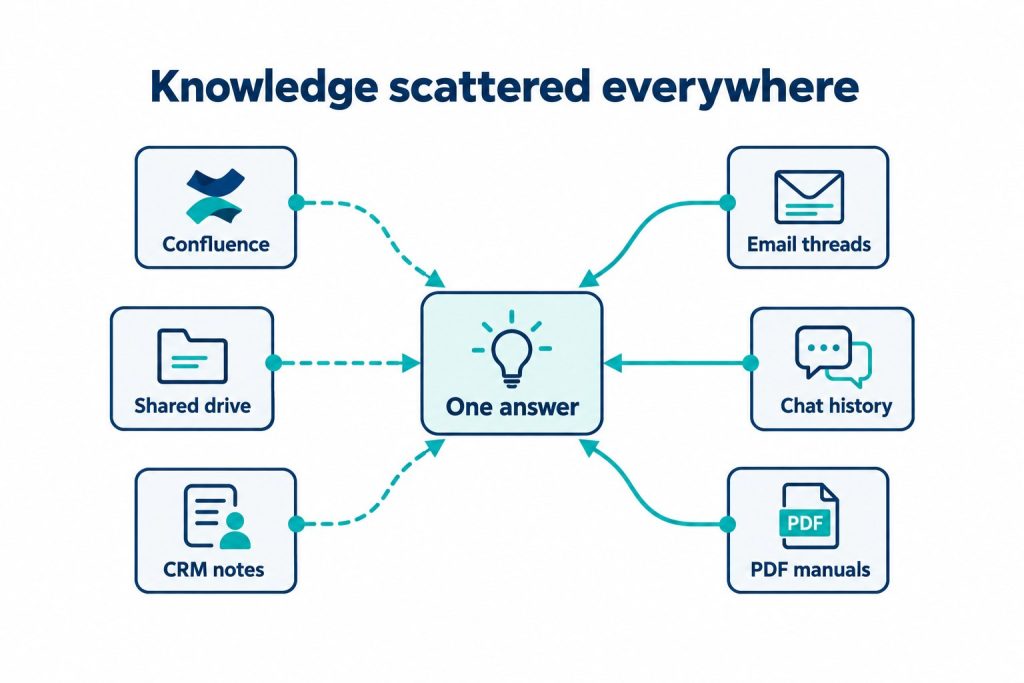
Knowledge base sprawl happens when an organization’s information gets scattered across documentation tools, CRM records, chat logs, and shared drives, with no single system able to answer a question using all of it at once. The result is not a lack of information; it’s information that exists but can’t be reached from one place. Fixing this isn’t primarily a documentation problem, it’s a retrieval and integration problem, which is why simply writing better help articles rarely solves it.
TL;DR
- Surveys show 54% of businesses run more than five disconnected tools for documentation and information sharing, and employees lose 1.8 hours a day searching for answers [source verified].
- Sprawl isn’t caused by too little content, it’s caused by content living in systems that were never designed to talk to each other.
- Larger context windows in modern AI models don’t fix sprawl. Models suffer “lost in the middle” degradation, which is why retrieval-based approaches (RAG) still matter for large knowledge bases.
- Connecting systems without native APIs typically takes 6 to 8 weeks per workflow using custom middleware, and integration maintenance can consume up to 28% of enterprise IT budgets.
- SMEs and enterprises hit the same wall at different points: SMEs sprawl across free-tier tools, enterprises sprawl across legacy systems and departmental silos.
About the Author: Fooyo builds AI knowledge base systems deployed into clients’ private cloud environments across Singapore, China, and Japan, working with government agencies, enterprises, and SMEs across Asia to connect fragmented documentation, CRM, and chat data into a single, source-cited answer layer.
What Exactly Is Knowledge Base Sprawl?
Knowledge base sprawl is the accumulation of organizational knowledge across multiple disconnected systems, none of which can be queried together. It’s the natural byproduct of adopting tools one problem at a time: a wiki for internal docs, a CRM for customer history, a helpdesk for support tickets, a chat app for real-time questions. Each tool solves its own problem well. None of them know the others exist.
The scale of this is well documented. Research shows 54% of businesses use more than five disconnected tools for documentation and information sharing, and that fragmentation isn’t a minor inconvenience. It costs employees 1.8 hours a day hunting for information they should already have access to, eating up 35 to 45% of potential productivity and costing an average of $12,506 per employee annually. That’s not a training issue. It’s an architecture issue.
- Docs sprawl: policies, SOPs, and product specs spread across wikis, PDFs, and shared drives with no version control.
- CRM sprawl: customer history, deal notes, and support interactions locked inside a system that support staff and sales rarely both query the same way.
- Chat sprawl: the actual answer to a recurring question often lives buried in a Slack thread or WhatsApp chat from six months ago, never captured anywhere searchable.
Why Do Enterprises and SMEs Both Hit This Problem, Just Differently?
Building on the definition above, the mechanism behind sprawl is the same regardless of company size, but the entry point differs. Enterprises accumulate sprawl through scale and legacy: a merger brings in a second CRM, a regional office adopts its own helpdesk, a decade of departmental tools never gets consolidated. SMEs accumulate sprawl through speed: a small team adopts a free-tier tool for every new problem, and within two years there are five or six systems nobody consciously chose to integrate.
This matters for how a company should evaluate enterprise knowledge management tools, because the assumption that sprawl is only a “big company problem” is wrong. A 20-person SME juggling a shared drive, a CRM, and a WhatsApp Business account has the same structural issue as a 2,000-person enterprise with five departmental wikis: the answer to a customer’s question is split across systems that don’t talk to each other. The fix needs to work for both, which is why Fooyo’s engagement model treats a government agency’s knowledge base and an SME’s support documentation as the same category of problem: fragmented sources needing one retrieval layer, not five.
Why Doesn’t a Bigger AI Context Window Just Solve This?
A reasonable question, given how much attention large context windows get. Anthropic and Google now offer 1 million token context windows, Meta claims up to 10 million tokens, and OpenAI offers up to 400K tokens, so it’s tempting to assume you can just dump everything into one prompt and ask a question. In practice, this doesn’t hold up at knowledge base scale.
These massive windows suffer from what’s called “lost in the middle” degradation, where information placed in the middle of a very long context gets effectively ignored by the model. Retrieval accuracy drops significantly once information spans multiple sections or documents, because the model struggles to comprehend relationships across that much material. This is exactly why retrieval-augmented generation (RAG) remains necessary for large knowledge bases: instead of asking a model to read everything, RAG retrieves only the relevant fragments first, then answers based on those fragments, with a citation back to the source.
Think of it like asking someone to answer a question by skimming an entire filing cabinet versus handing them the three folders that are actually relevant. A bigger filing cabinet doesn’t make the skimming faster or more accurate, it makes it worse. That’s the mechanism RAG is built to avoid.
What Makes Integrating CRM, Docs, and Chat Technically Hard?
The technical difficulty isn’t storing the data, it’s connecting systems that were never built with a shared API contract. Connecting enterprise systems without native API support typically requires custom middleware, RPA bots, or computer vision adapters, and implementation timelines often run 6 to 8 weeks per workflow. Maintaining those custom integrations afterward is its own ongoing cost: up to 28% of enterprise IT budgets go toward keeping these bespoke connections working, because they need constant manual intervention when the underlying systems update or change their data formats.
This is the part of knowledge base integration that gets underestimated. It’s not a one-time project, it’s an ongoing maintenance commitment, which is why integration architecture decisions made early tend to compound in cost either direction, good or bad.
- Docs: usually the easiest to ingest, since most live as text or PDFs with stable structure.
- CRM: harder, because CRM data is relational and permission-gated, not just text to retrieve.
- Chat: hardest, because the useful knowledge is buried in conversational threads, not structured records, and needs to be extracted before it’s queryable at all.
How Should a Company Compare Knowledge Base Software Options?
A related but distinct question from the technical mechanism above is how to actually choose between platforms once the sprawl problem is acknowledged. A useful knowledge base software comparison should weigh five factors, not just price:
| Factor | What to Check |
|---|---|
| Source grounding | Does every answer cite the document or record it came from, or does it just generate plausible-sounding text? |
| Integration depth | Does it read from existing CRM, POS, and CMS systems, or does it require migrating data into a new silo? |
| Deployment model | Is data processed in a shared public model, or in a private, dedicated environment? |
| Update cadence | Does the knowledge base re-index automatically as source documents change, or does it go stale? |
| Action capability | Can an answer trigger a workflow (e.g. update a CRM record, escalate a ticket), or does it stop at generating text? |
Most ai knowledge base software on the market handles the first two factors reasonably well. Fewer handle private deployment and workflow triggering, which is where the gap between a chatbot and a genuinely useful knowledge system tends to show up.
What Role Does Data Residency Play in Choosing a Deployment Model?
Stepping back from tooling comparisons, a separate concern for regulated organizations is where the data physically sits. Regulated industries must comply with frameworks like HIPAA, GDPR, and the EU AI Act, which mandate strict data residency rules restricting where content can be stored or processed. Meeting these obligations generally requires on-premise or air-gapped RAG deployments, keeping sensitive data, retrieval infrastructure, and vector databases entirely within the organization’s own network perimeter.
This is a core reason Fooyo deploys its AI Knowledge Base into each client’s private cloud rather than a shared public model. It’s not a generic security pitch, it’s a direct response to the residency requirement above: client documents, CRM records, and chat logs used to ground answers never leave the client’s own infrastructure or get used to train a shared model. For a government agency or a healthcare provider, that’s not optional. For an SME without formal compliance obligations, it’s still the safer default, since the same architecture keeps proprietary business data out of any third party’s training pipeline.
What Does a Working Fix for Sprawl Actually Look Like?
Building on the residency and integration points above, a working fix has to do three things at once: pull from existing systems without replacing them, retrieve only the relevant fragments rather than dumping everything into a prompt, and cite its sources so a human can verify the answer before acting on it. An enterprise search software layer built this way connects to existing systems rather than replacing them, pulling answers from fragmented sources and citing where each answer came from.
Fooyo’s approach reflects this directly: its AI Knowledge Base plugs into existing CRM, POS, CMS, and messaging channels, retrieves grounded answers with source citations, and includes human-in-the-loop review gates before any triggered action executes. Deployment typically starts with a 30-minute demo and a scoped pilot before moving to private-cloud production, which is part of why projects move in weeks rather than the standard six-month enterprise build cycle.
Frequently Asked Questions
Is knowledge base sprawl only an enterprise problem?
No. SMEs experience the same fragmentation, usually through rapid adoption of separate free-tier tools rather than legacy system accumulation, but the structural problem, disconnected sources with no shared answer layer, is identical.
Does a large AI context window remove the need for RAG?
No. Even million-token context windows suffer “lost in the middle” degradation, where mid-context information gets effectively ignored, so retrieval-based approaches remain necessary for accuracy at knowledge base scale.
How long does it typically take to integrate a system without a native API?
Custom middleware or RPA-based integrations typically take 6 to 8 weeks per workflow, and ongoing maintenance can consume a meaningful share of enterprise IT budgets.
Can knowledge base tools trigger actions, not just answer questions?
Some can. Systems built for workflow automation, rather than pure documentation search, can trigger downstream actions like updating a CRM record, ideally with a human review step before execution.
Why does private cloud deployment matter for a knowledge base?
Regulated industries face data residency requirements under frameworks like GDPR, HIPAA, and the EU AI Act. Private or air-gapped deployment keeps sensitive data inside the organization’s own network perimeter instead of a shared public model.
What’s the difference between a standalone knowledge base and an integrated one?
A standalone knowledge base stores and organizes content on its own. An integrated one connects to CRM, chat, and other live systems so answers reflect current records, not just static documentation.
About Fooyo
Fooyo is a Singapore-headquartered company building data platforms and AI agents for enterprises, with additional offices in China and Japan. Its AI Knowledge Base product is a RAG-based system that lets users ask questions across an entire knowledge base and trigger automated actions from the answers, grounded, source-cited, and deployed into each client’s own private cloud. Fooyo is trusted by government agencies, enterprises, and SMEs across Asia, and takes an end-to-end role: building and operating the product with clients rather than handing over a report or prototype and leaving. Projects typically move from a 30-minute demo to a working pilot in weeks, not the six-month cycle common to enterprise AI builds.
If disconnected docs, CRM records, and chat logs are slowing down how your team finds answers, get in touch with Fooyo to see how a private, source-cited knowledge base could fit into your existing stack.